Shopify merchants are already rebuilding themes with Codex, Claude, Cursor, and other AI coding tools. In recent Reddit discussions, the useful advice was not 'AI can code' or 'AI cannot code.' It was more specific: AI is good at bounded changes when it can see the existing theme, and dangerous when it invents a new system without understanding the one already there.
One developer described asking an AI tool for a slider. It wrote a fresh JavaScript slider inside the section, missed the existing slider component, exposed few settings, and produced roughly five times the code required. The feature worked. The implementation still made the theme worse. That is the line this workflow is designed to catch.
AI output is a draft, not a deployment event
A plausible storefront preview proves only that one path rendered once. It does not prove that the section is editable, variants still work, app blocks load, analytics fire once, translations survive, focus order makes sense, or the code fits the theme's architecture. The faster code becomes to produce, the more important it becomes to slow down the decision to publish it.
"Let AI shorten the typing. Do not let it shorten the distance between an idea and production review."
— Thought Bulb
Step 1: make two backups, because they solve different problems
- ✓Duplicate the live theme in Shopify admin so there is an immediate store-side recovery point
- ✓Download the theme as a dated ZIP before the work begins
- ✓Connect the theme to a company-controlled GitHub repository so every code and theme-editor change has history
- ✓Export or separately protect the content and app-owned data the theme copy does not contain
- ✓Record the live theme ID, connected branch, release owner, and rollback decision before anyone edits code
Shopify recommends duplicating a theme before customization. It also warns that a downloaded theme does not include products, collections, menus, pages, blog posts, images, or files. A theme backup is necessary, but it is not a store backup.
Step 2: give the agent the theme's rules before the feature request
The quality of an AI change depends heavily on whether the tool can see the code it should reuse and the constraints it must preserve. A prompt that says 'build a product slider' invites invention. A task that identifies the existing slider snippet, schema conventions, CSS tokens, supported browsers, accessibility behavior, and merchant settings creates a bounded engineering job.
- ✓Name the existing component, snippet, or section that should be extended before new code is created
- ✓List files the task may change and files it must not touch
- ✓State the storefront behavior, merchant-editor controls, mobile behavior, and accessibility acceptance criteria
- ✓Require the agent to explain which existing patterns it reused and why any new dependency is necessary
- ✓Ask for the smallest diff that satisfies the requirement, not a rewrite of the surrounding theme
Step 3: work on an unpublished theme and a disposable branch
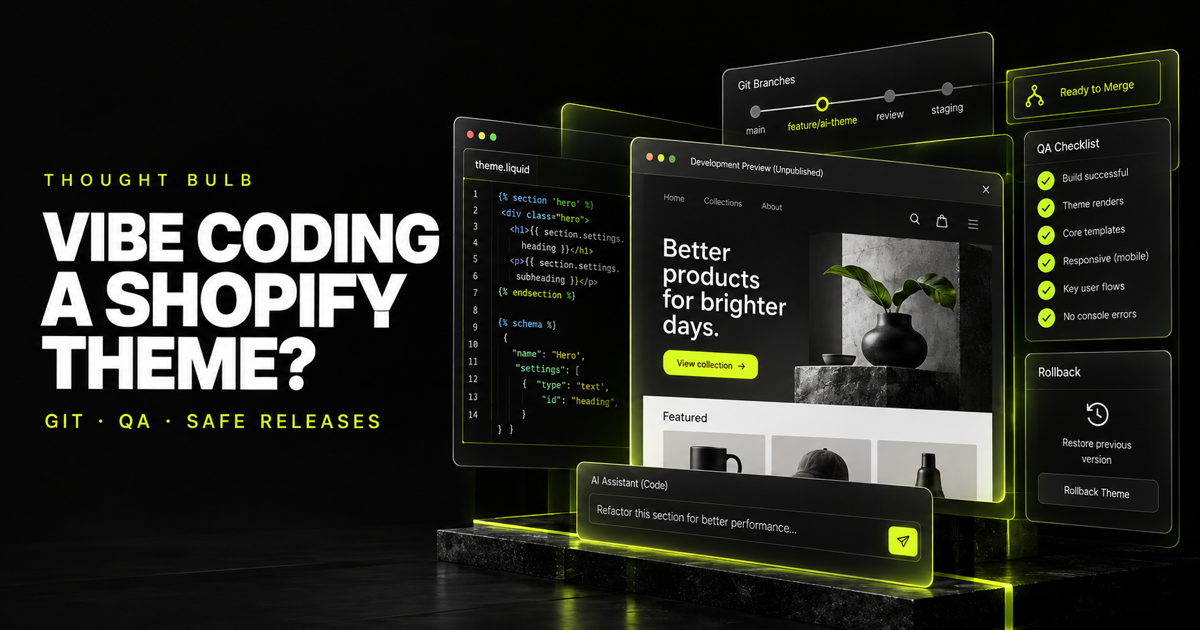
Shopify CLI can run a development theme against real store data, while the GitHub integration can connect separate branches to unpublished themes. Use both boundaries. The AI works on a feature branch; Shopify renders an unpublished preview; a human reviews the diff and behavior; only an approved commit reaches the branch connected to the published theme.
git switch -c ai/product-gallery
shopify theme dev --store your-store
shopify theme check
Do not give an autonomous tool a deployment token or a workflow that can publish the live theme merely because it can. The ability to generate code and the authority to release it are separate permissions.
Step 4: review the diff for the problems the preview hides
- ✓Duplicate components: did the change rebuild a slider, modal, drawer, money formatter, or focus trap the theme already has
- ✓Global selectors: can new CSS or JavaScript affect sections outside the feature
- ✓Hard-coded content: can the merchant change text, imagery, products, spacing, and visibility without editing code
- ✓Settings risk: did the change rewrite config/settings_data.json or remove existing section settings
- ✓Performance: did it add a library, unbounded loop, remote asset, blocking script, or oversized media path
- ✓Accessibility: do controls have names, keyboard behavior, focus states, reduced-motion behavior, and usable contrast
- ✓Analytics: can the new interaction duplicate or suppress existing storefront events
- ✓App compatibility: does the section preserve app blocks, product forms, subscription selling plans, and accelerated-payment behavior
Run Shopify Theme Check, but do not mistake linting for acceptance testing. Theme Check catches Liquid and JSON errors, deprecated or unknown tags, missing templates, some performance problems, and code-quality issues. It cannot tell you whether the business rule is correct.
Step 5: test the buying path, not only the new component
- ✓Representative product with one variant, many variants, unavailable variants, subscriptions, bundles, and app content
- ✓Add to cart, cart quantity changes, cart drawer, discount behavior, checkout handoff, and return from checkout
- ✓Search, predictive search, filters, pagination, account links, forms, and localization
- ✓Mobile Safari and Chrome, keyboard-only use, reduced motion, zoom, and a slow network profile
- ✓Analytics and consent behavior, including a check that important events fire once rather than twice
- ✓Theme editor: add, remove, reorder, and configure the section as the merchant team will
Step 6: release with a rollback trigger, not a hopeful refresh
Publish during a monitored window. Record the commit and theme being released. Watch checkout, add-to-cart, JavaScript errors, performance, search, and support reports. Decide in advance what forces a rollback: a broken purchase path, missing content, material tracking loss, or an error rate above the agreed threshold. If that line is crossed, restore first and diagnose second.
What AI should and should not own
AI is excellent for tracing an unfamiliar theme, drafting a small section, converting repeated markup into a snippet, explaining Liquid, adding schema settings, writing test cases, and finding suspicious duplication. It should not be the sole owner of architecture, production credentials, accessibility sign-off, analytics validation, or the decision that a revenue path is safe to release.
That is not an argument against vibe coding. It is the workflow that makes the speed usable. The teams getting durable value from AI are not removing engineering discipline. They are applying it to more changes with less typing.
If an AI-assisted change has grown beyond a clean diff—or your theme already has several overlapping patterns—we can audit, simplify, and ship the work without gambling the live store.
Review the Shopify build →Sources and discussion trail
Shopify documents how its GitHub integration tracks admin and repository edits, connects branches to themes, and handles conflicts.
Read Shopify's GitHub workflow →Shopify's Theme Check documentation covers the Liquid, JSON, performance, and deprecation issues the official linter can detect.
Review Shopify Theme Check →Shopify recommends duplicating a theme before customization and explains what a theme download does not back up.
Review Shopify theme backups →This merchant and developer discussion contains the practical advice and failure modes that informed the workflow above.
Read the AI theme discussion →