Skip to content

On the Shopify App Store

Give customers a reason to buy more.

Five bundle types for your Shopify store: ready-made sets, quantity breaks, BOGO, mix and match, and build-your-own boxes, on your product pages or a page of their own. Not sure which to run? Answer two questions in Help me choose and the app recommends one. The widget takes on your theme’s look, and the discount applies on its own at checkout.

  • Free for your first $200 in bundle sales, lifetime
  • every bundle type on every plan
  • paid plans from $12.99 a month
  • billed through Shopify
◇ Inside the app

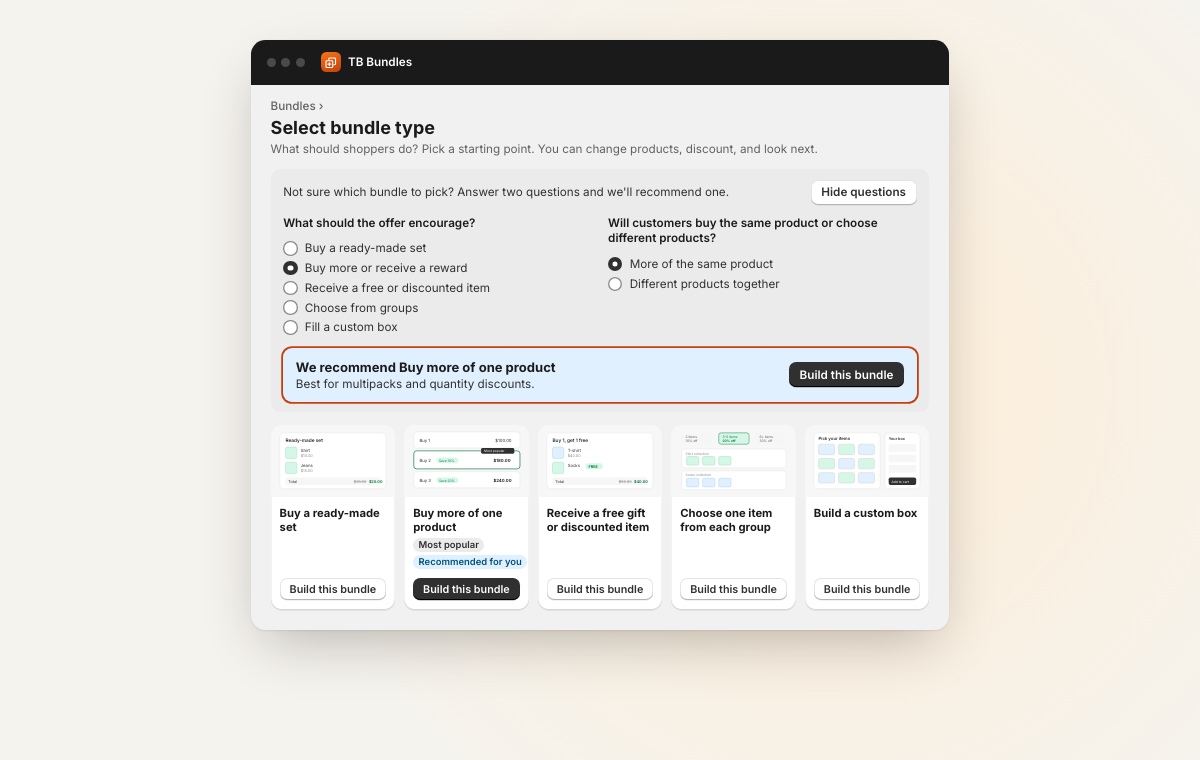
Five types. Two questions pick yours.

Help me choose asks what the offer should encourage and whether customers buy one product or several, then recommends a type. Every type is on every plan, the free one included. These are the screens you and your customers see.

TB Bundles

On the product page, or a page of its own.

Every plan
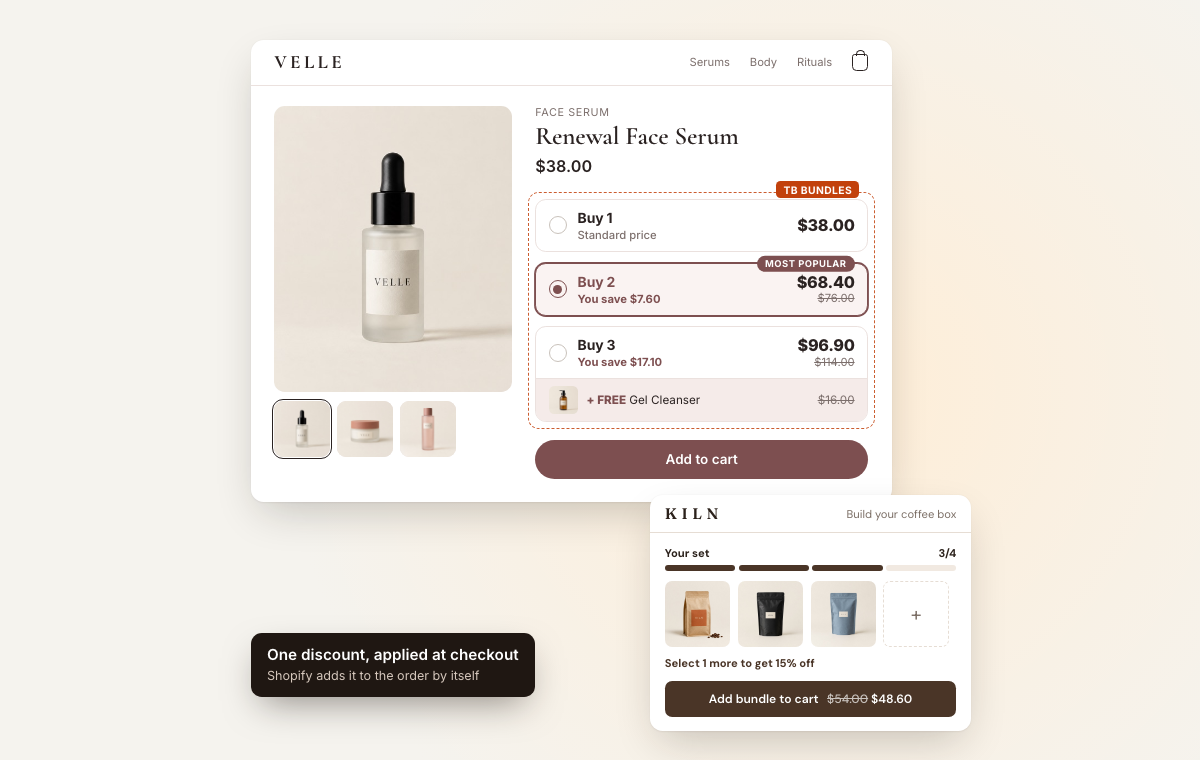
A skincare product page with quantity breaks and a free gift, beside a coffee box three items into a set of four
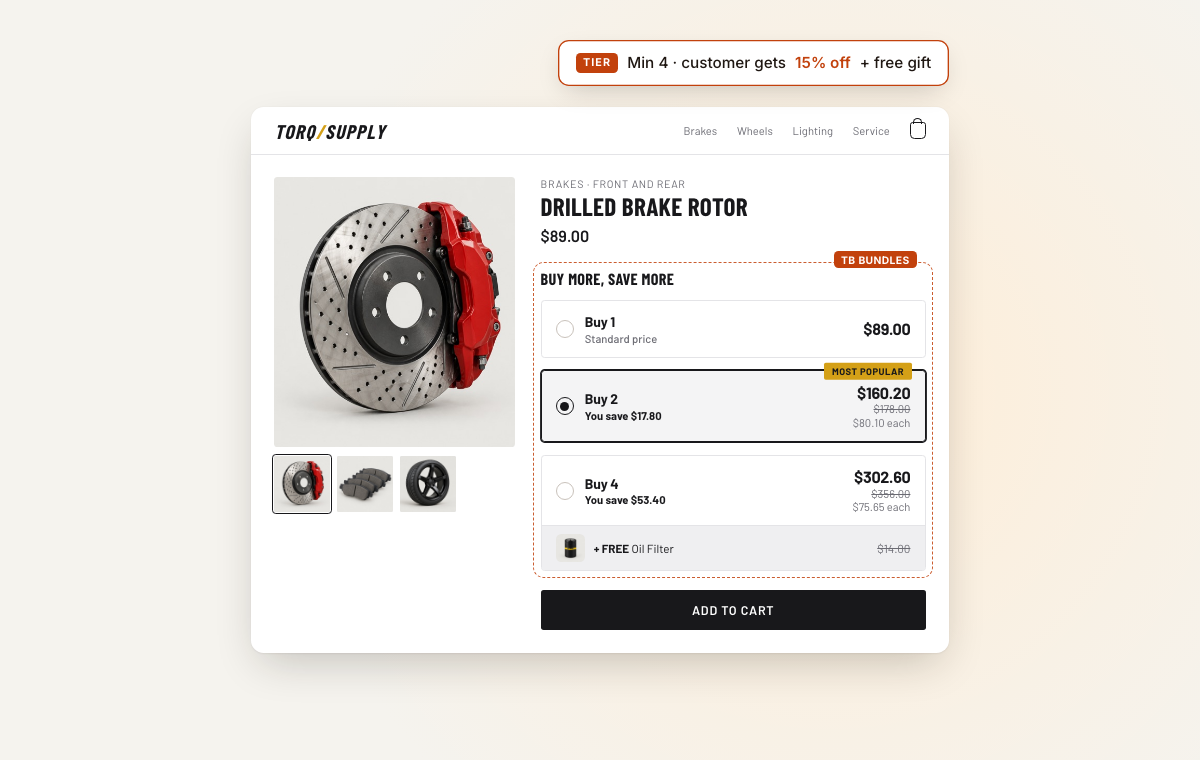
  • On the product pageQuantity breaks with a most popular tier and a free gift, in the store's own colours.
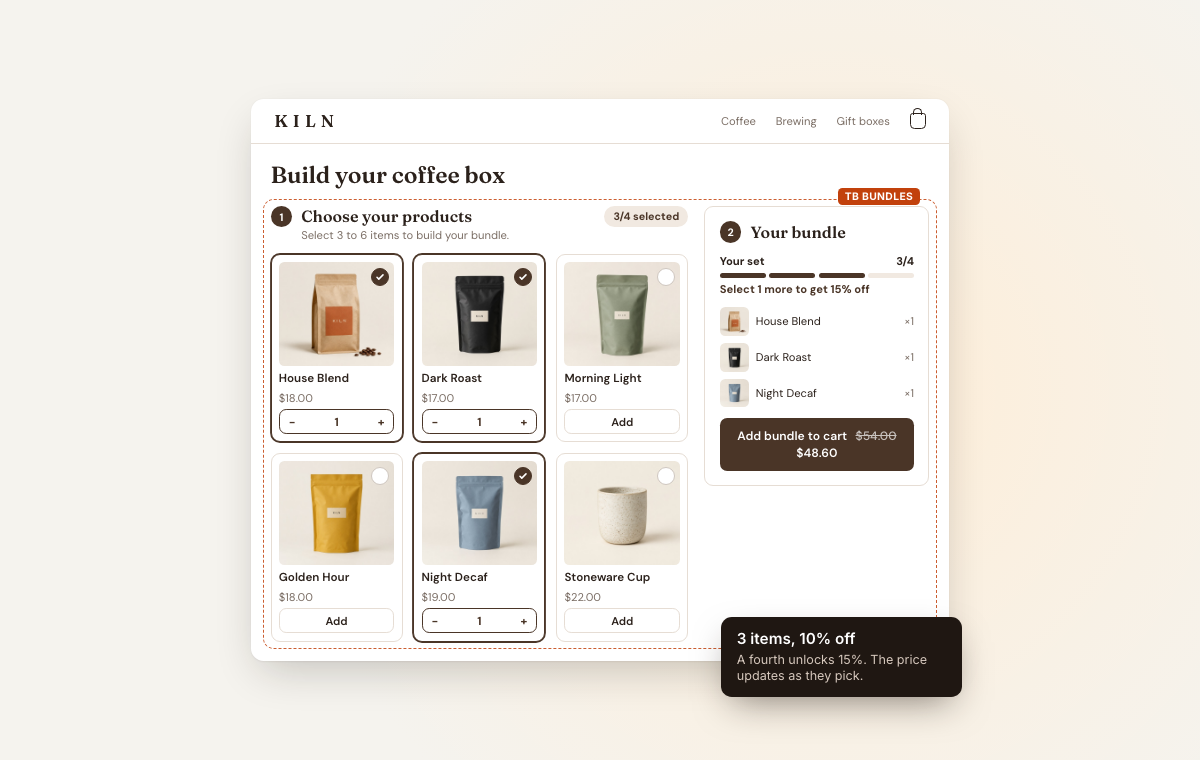
  • Or on a page of its ownA box customers fill, with the price dropping as they add.
  • One discount at checkoutShopify adds it to the order, so customers never type a code.
How TB Bundles works
◇ On your storefront

Fits your theme. Adds up at checkout.

One app embed and no theme code. Shoppers see what they save as they choose, and Shopify applies the same discount when they pay.

Looks like your store

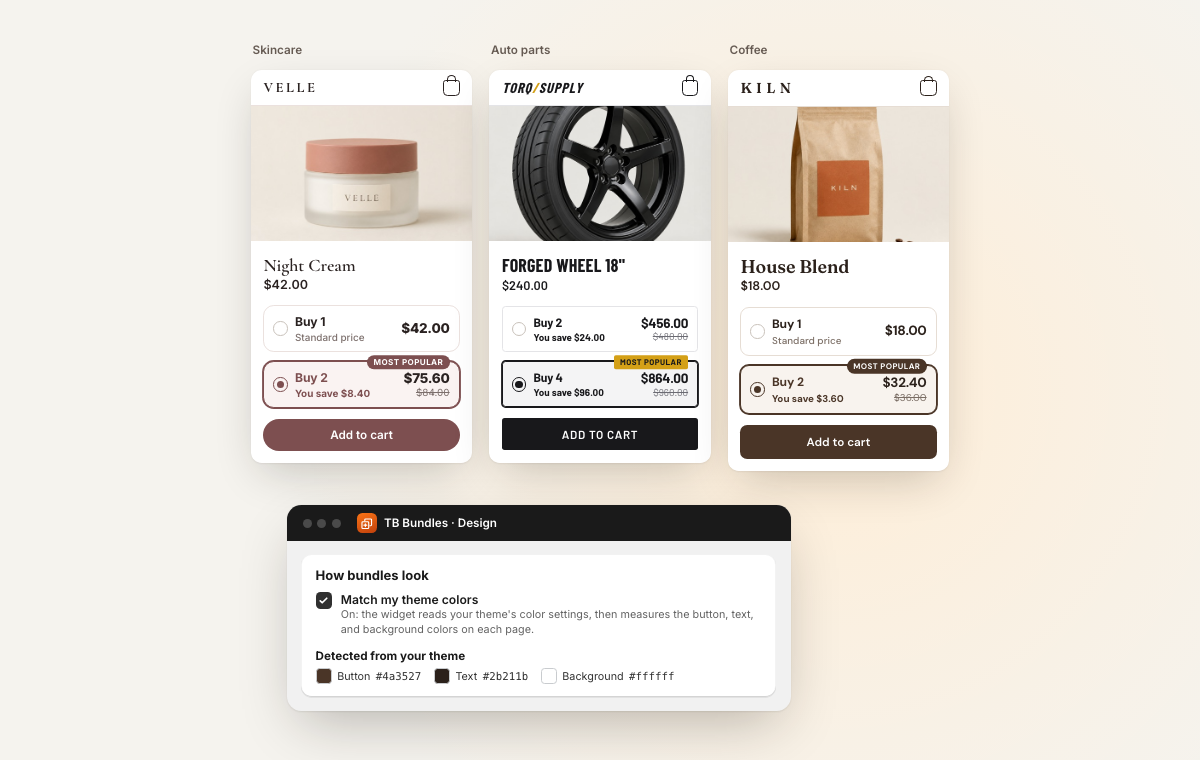
Match my theme colors is on from the start: the widget reads your theme's colour settings and measures the button, text and background on each page. Set corners, type and badge position once for every offer, or change them on one.

Savings shoppers can see

Tier ladders, savings badges, the next tier on a box and a live total show what one more item unlocks, before anyone reaches the cart.

One discount at checkout

Shopify works out the discount when the bundle reaches the cart, so shoppers never type a code and cannot change the price in their browser. Prefer a code? Switch the offer to code mode and the app makes one.

Real products, real stock

A bundle adds the actual products to the cart, so stock is counted on each one, and every order line says which offer it came from.

◇ Beyond the widget

Bundle ideas from your orders.

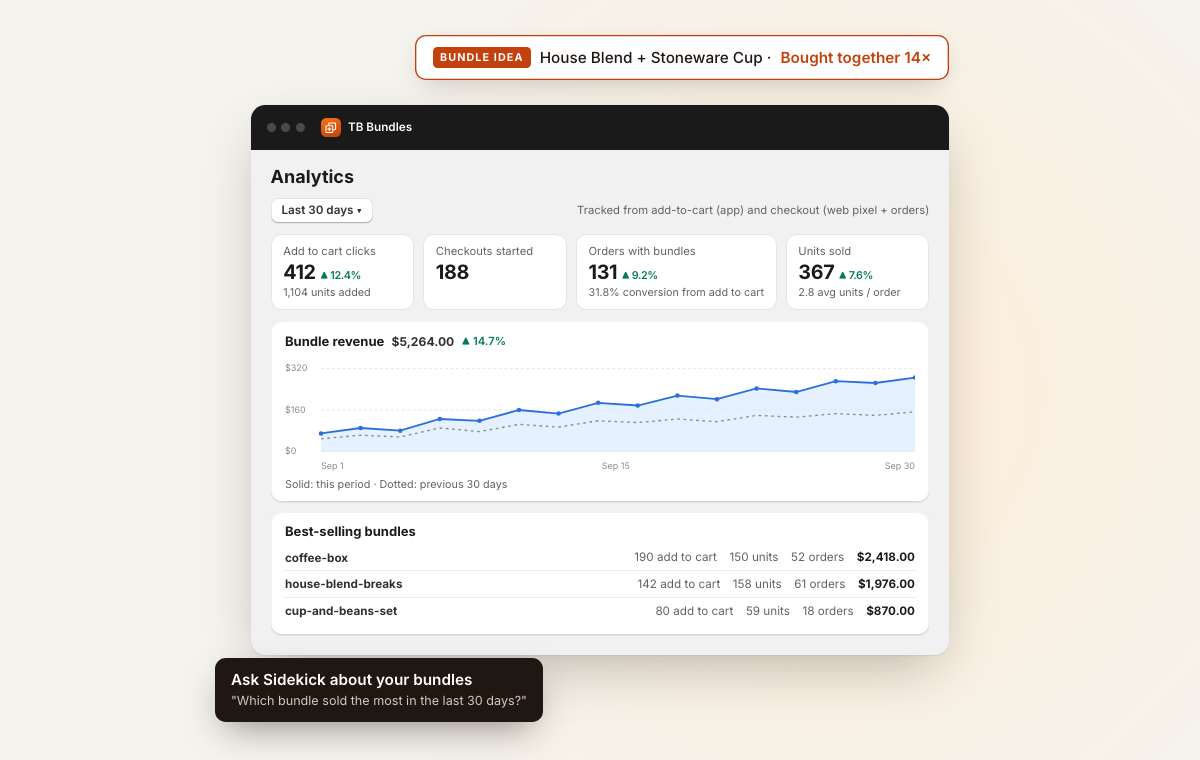
The app looks at what your customers already buy together and lists the pairs on the home page. One click opens a ready-made set with both products in it.

Scheduling

Offers that start and stop on their own

Give an offer a start and an end. Outside those dates it simply does not show, so there is nothing to unpublish after a weekend promotion.

Ask Sidekick

“Which bundle made the most in the last 30 days?”

Sidekick answers from TB Bundles with revenue, orders, units and conversion for 7, 30 or 90 days, ranks your bundles, or compares this period with the last. It reads your bundles and never changes them.

◇ The details

Clear rules before you publish.

The edge cases that trip bundles up on Shopify, and what the app does about each.

  • Gift cards stay outShopify cannot discount a gift card, so the pickers leave them out of free gifts.
  • Unlisted works, draft does notUnlisted products can sell as bundle-only items. Draft products cannot be sold, so they stay out.
  • Orders say what was bundledLines carry properties such as Part of and Tier, so whoever packs the order can see the offer.
  • Show it where it fitsOne product or variant, a collection, a tag or every product page, with products left out if you like.
  • Choose who sees itEveryone, B2B buyers only, or everyone except them, and include or leave out markets and countries.
  • SubscriptionsSubscription-only products are left out. Products sold both ways join a bundle as a one-time purchase.
◇ How it works

Your first bundle in four steps.

Nothing shows on your store until you set a bundle to Active, and you can switch it back to Draft at any time.

  1. Install

    Install and switch it on

    Install from the Shopify App Store, press Initialize app and turn on the app embed. A checklist on the home page walks you through it.

  2. Type

    Pick a bundle type

    Start from the gallery, or answer two questions in Help me choose and the app suggests one.

  3. Offer

    Add products and a discount

    Choose the products, set a percentage, an amount off or a set price, and pick the pages it shows on.

  4. Publish

    Set it to Active

    Save it as Active and it appears on the product pages you chose. Drafts never show on your store.

◇ Pricing

Free to start. Priced by bundle sales.

Every plan has all five bundle types, the theme app blocks and analytics. Plans step up in bundle sales, counted as the value of orders that include a bundle, and in how many bundles can be active at once.

Start here

Free

$0/ month

Up to $200 in bundle sales, lifetime

  • Up to 5 active bundles
  • All five bundle types
  • Theme app blocks and analytics

No charge until you upgrade

Starter

$12.99/ month

Up to $1,000 in bundle sales a month

  • Up to 25 active bundles
  • All five bundle types
  • Theme app blocks and analytics
  • Developer metafield docs

14-day free trial

Growth

$24.99/ month

Up to $5,000 in bundle sales a month

  • Up to 100 active bundles
  • All five bundle types
  • Theme app blocks and analytics
  • Developer metafield docs

14-day free trial

Pro

$49.99/ month

Unlimited bundle sales

  • Unlimited active bundles
  • All five bundle types
  • Theme app blocks and analytics
  • Developer metafield docs

14-day free trial

Billed in USD through Shopify. Change plan or cancel any time from your Shopify admin, and the app emails you at 80% and 95% of your allowance.

◇ FAQ

Questions merchants ask before installing.

More in the documentation FAQ.

Does it work with my theme?

It is built to work with any theme, and we have tested the cart updates on Horizon, Dawn, and Maestrooo's Stretch, Impact and Prestige. The widget runs from an app embed you switch on in the theme editor, so your theme files are never edited.

Do shoppers need a discount code?

No. Each offer applies its discount on its own when the bundle reaches the cart. If another automatic discount on your store gets in the way, you can switch an offer to code mode, and the app makes a code and applies it for the shopper when they add the bundle.

How is inventory handled?

Bundles are made of your real products and variants, added at the moment the shopper adds the bundle, so stock is tracked on each product in it.

Do bundles work with subscriptions?

Products that can only be bought on a subscription are left out of the pickers. Products that offer both one-time and subscription purchase work in bundles as one-time purchases.

Will it slow my store down?

The widget is one small script and stylesheet. The plus and minus buttons respond straight away, and on an empty cart the bundle goes in without extra round trips.

Can unlisted products be sold in a bundle?

Yes. Unlisted products can sell as bundle-only items. Draft products cannot be sold, so they are kept out.

How do orders show which bundle was bought?

Checkout and order lines carry properties such as Part of and Tier, so fulfilment can see which offer each item belonged to.

Can gift cards be free gifts?

No. Shopify cannot discount gift cards, so the pickers leave them out.

What counts as bundle sales?

The value of orders that include a bundle. The free plan covers your first $200 of them in total. Starter covers $1,000 a month, Growth $5,000 a month, and Pro has no limit.

How many bundles can I run at once?

Up to 5 active bundles on Free, 25 on Starter, 100 on Growth, and as many as you like on Pro. Drafts do not count, so you can prepare offers and switch them on later. Every bundle type is on every plan.

What happens when I reach my plan's allowance?

The app emails you at 80% and 95%. At 100%, bundle discounts pause and you cannot publish new offers until you upgrade, or on a paid plan, until the next month starts.

Is there a free trial?

The free plan costs nothing until your total bundle sales pass $200, counted over the life of the store. Starter, Growth and Pro each start with a 14-day free trial, then bill monthly through Shopify. You can cancel from your Shopify admin at any time.
Your first bundle can be live today.

Install on the free plan, pick a bundle type and publish from your Shopify admin. Or talk with the Thought Bulb team and we’ll help you shape the first offer.