Suggest changes for me to review
The rule lists what it would change, with the margin before and after on each row. You edit any price, tick the ones you want and apply them together. Every new rule starts here.
Nothing changes until you say so
TB Dynamic Pricing updates your Shopify prices in bulk. Rules suggest the changes, each suggestion shows your margin before and after, and you tick the ones you want. Once you trust a rule, you can let it change prices each night on its own. Any batch can be undone in one press.
Every suggestion shows the price and the margin before and after, and nothing is written to your store until you apply it. These are the screens you work in.
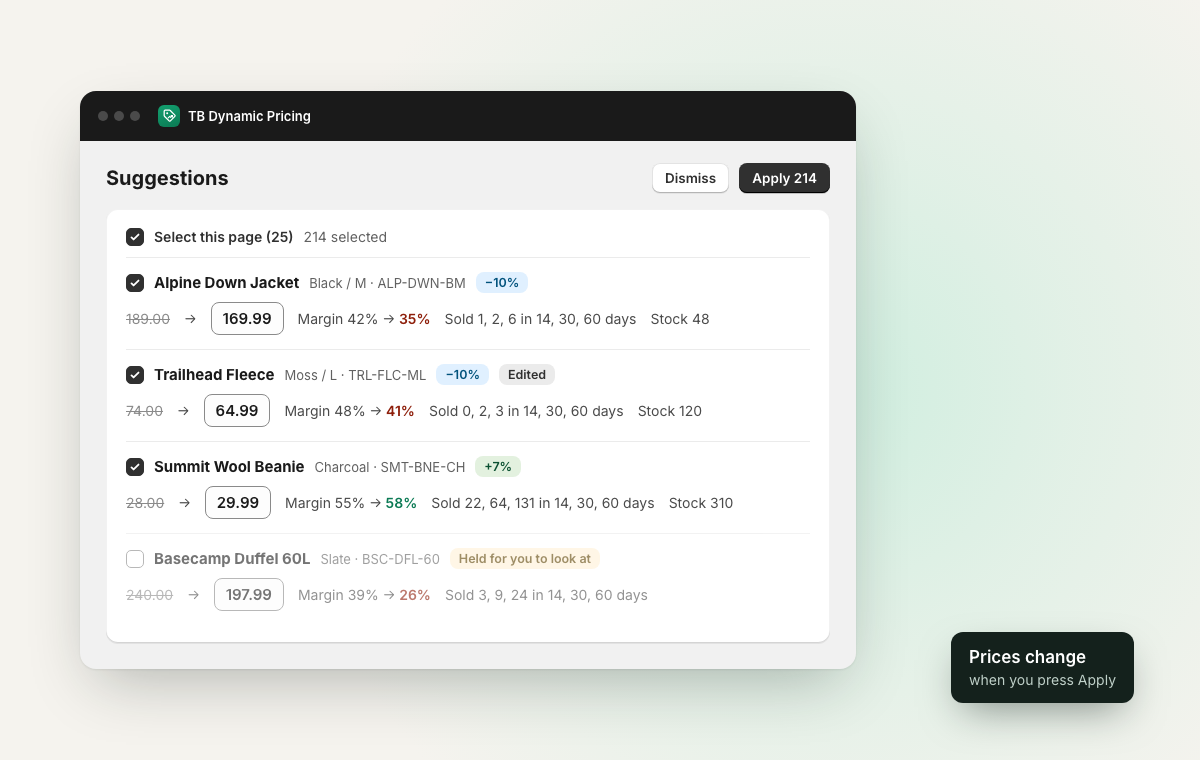
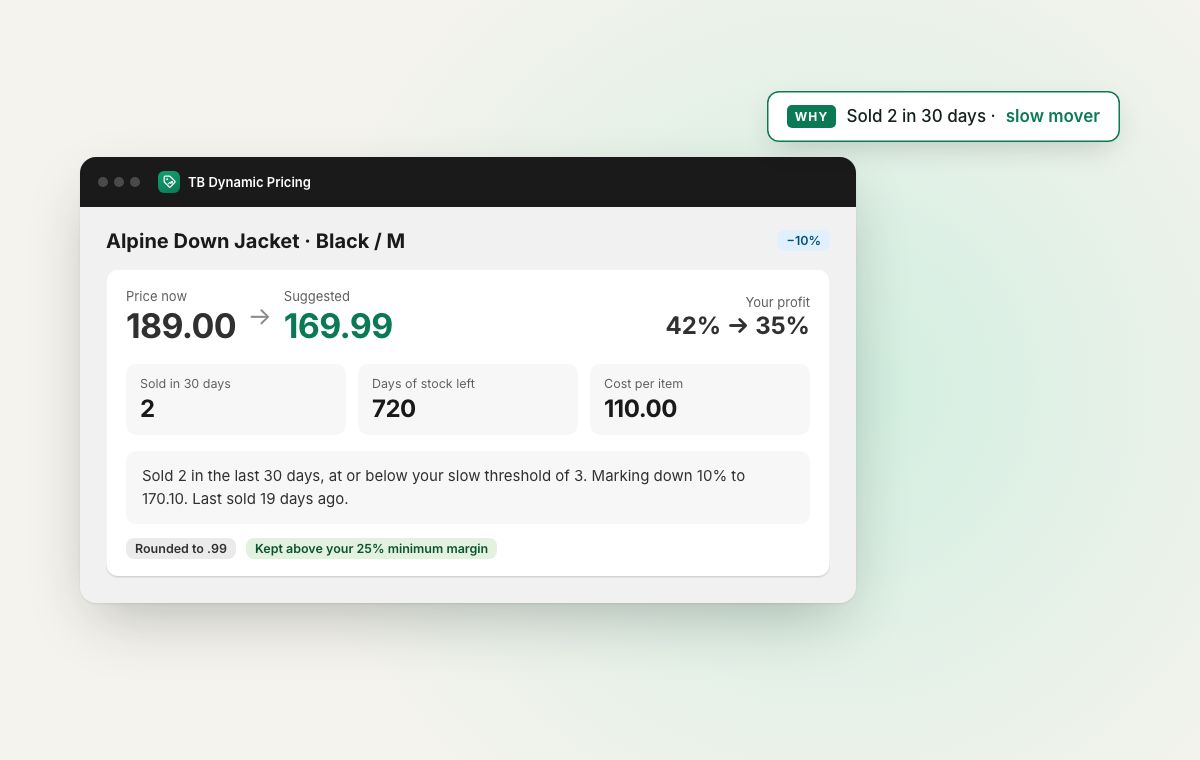
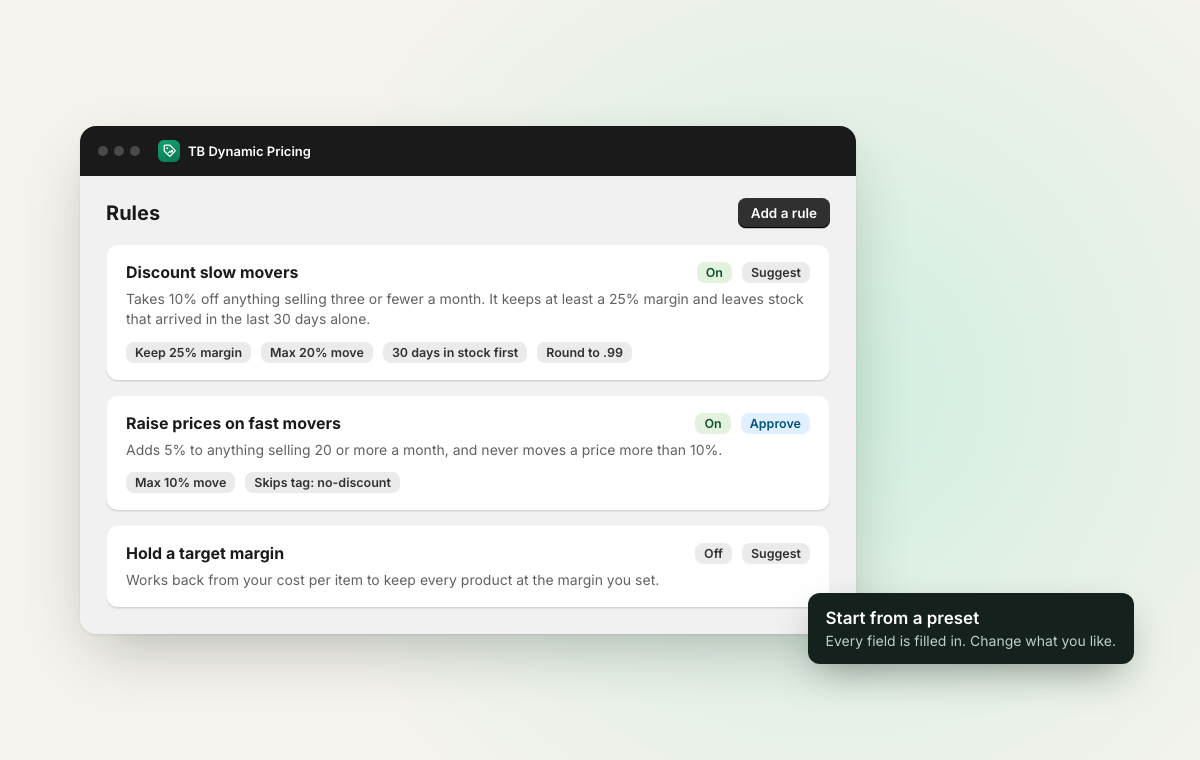
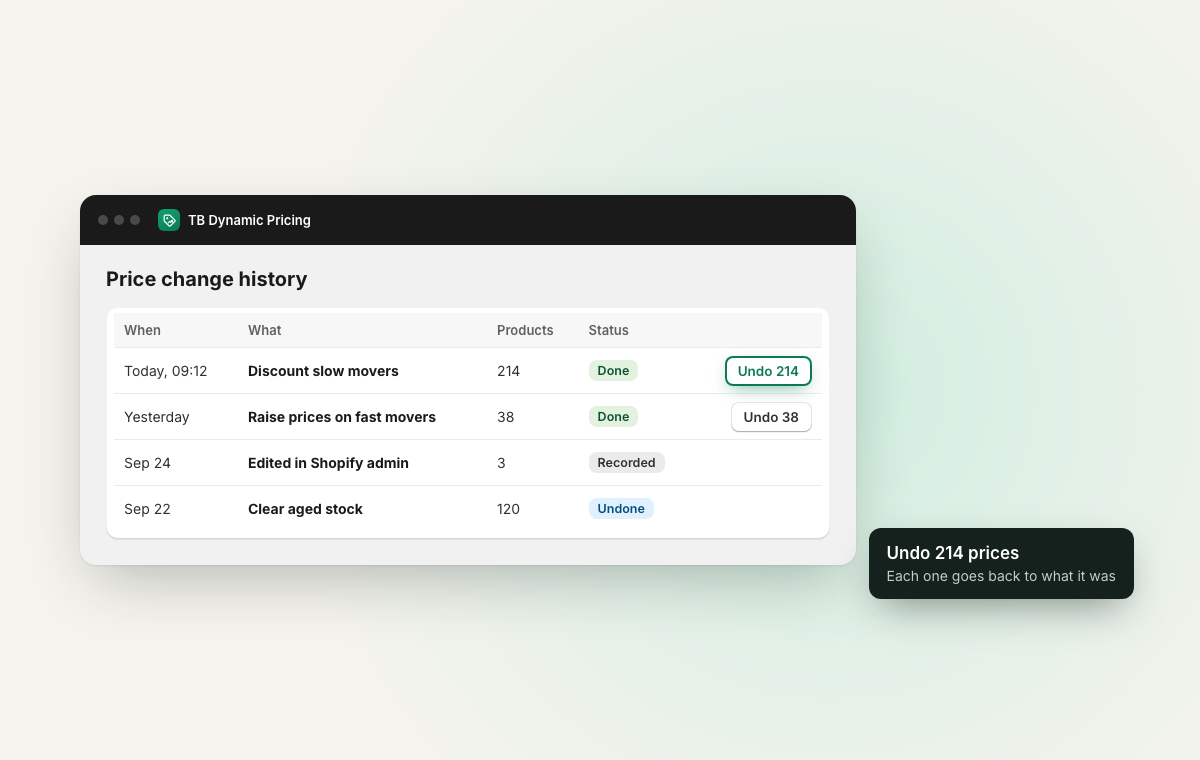
Start from a preset and edit anything in it: what counts as slow or fast, how much to move, the target margin, the steps for aged stock, which products it covers and the limits it keeps to.
The rule lists what it would change, with the margin before and after on each row. You edit any price, tick the ones you want and apply them together. Every new rule starts here.
The rule runs each night after the price check and applies what it finds. Every change still has to pass the rule's limits and the EU price rules if you use them, and you can undo any of it from History.
An automatic rule pauses while automatic price changes are off in Settings, or when your catalog has been over your plan’s limit for 14 days. It keeps making suggestions in the meantime. How rules work
Pick the products, the discount, a start and an end. When the end comes, the app puts every price back, apart from any you changed by hand while the sale ran.
The app lowers the prices in Shopify and your store shows the old price crossed out. When the sale ends, it puts them back. This way needs automatic price changes switched on in Settings.
Product pages keep the full price and the discount comes off in the cart and at checkout. Shopify starts and stops the discount on your dates, and your prices stay as they are.
Before a sale is saved, the app checks it against your other discounts and sales on the same products, and won’t let them add up past the total you set or below cost. You can also stop discount codes working on carts with sale items. How scheduled sales work
“Start a 20% sale on Outerwear next Friday for a week.”
Sidekick opens the new sale form with that filled in, and you check it and press Save. You can also ask it which prices to change, and it lists the suggestions waiting for you with the margin on each.
Every rule carries its own limits, and the app tells you when one of them changed a price.
A lowest margin, a lowest and highest price, the biggest change allowed at once, how long stock must have been on the shelf, and the price ending you want. When a limit changes a price, the suggestion says which one.
Anything that arrived last week looks slow to a 30-day sales figure, so every markdown preset leaves stock alone until it has had time to sell.
Worked out from the cost per item you record in Shopify. Where there is no cost, the app says so, and a rule with a margin limit won't mark that product down.
Automatic changes are off when you install. If you turn them on, one switch in Settings stops every rule at once, and the app checks it again at the moment a price would be written.
One screen built from your costs, your prices and your last 60 days of orders, with each product linked to its page in the app.
Your average margin, a count of prices in each margin band, and the prices under a margin you pick, with any that sell below cost. Products with no cost entered are counted so you can fill them in.
What sold over 14, 30 and 60 days, what hasn't sold once in that time and what that stock cost you, and how many days your stock will last at the current rate.
Each price the app changed in the last 60 days, with what sold at the new price since. Shopify gives running totals with no count per day, so the screen shows the sales without claiming the change caused them.
Sales figures refresh each night, and the screen says when they are more than three days old. What the analytics show
Nothing is written to your store until step three, and step four is there if you change your mind.
The app reads your products, costs and recent sales, and records every price from that moment on.
Slow movers, fast movers, target margin, aged stock or overstock. Every number is filled in, and you can change any of them, along with the products the rule covers.
Read the price and the margin before and after, edit any figure, tick the rows you want, and apply them together.
Every batch is one entry in your history, and one press puts it back to the exact prices it replaced.
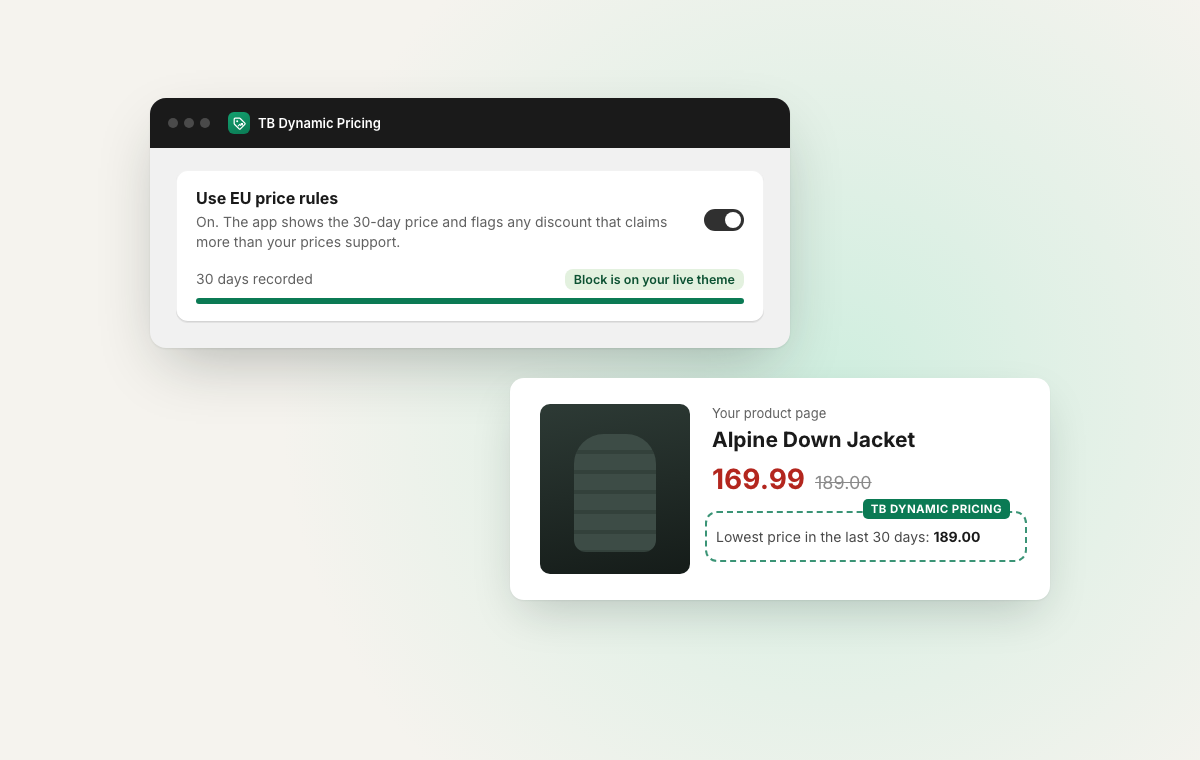
When you announce a price reduction to EU shoppers, the EU rules ask you to show the lowest price you charged in the 30 days before it. Switch the EU price rules on and the app works that price out from your own history and shows it wherever the discount shows. Stores outside the EU can leave it off.
Where the line appears, how it handles currencies and product options, and what the app leaves alone, on one page for EU stores.
How the 30-day price worksEssentials suggests and you apply, with bulk apply and undo included. From Growth up, rules can change prices on their own, sales run on their dates and the analytics screen is included. Scale has the same features as Growth with room for more prices, and Pro adds separate EU price rules for each market.
or $120 a year
Up to 250 prices tracked
14-day free trial
or $290 a year
Up to 2,000 prices tracked
14-day free trial
or $690 a year
Up to 10,000 prices tracked
14-day free trial
or $1,490 a year
Unlimited prices tracked
14-day free trial
One price per version of a product: a shirt in three sizes and two colors is six prices. Paying yearly costs the same as 10 months. Billed in USD through Shopify, and you can cancel any time from your Shopify admin. The same support on every plan.
More in the documentation FAQ.
Not unless you set a rule up to. Every rule starts by suggesting, and automatic changes are off when you install, so nothing changes price until you press Apply. On Growth and above you can switch a rule to change prices automatically each night, and one switch in Settings stops every rule at once.
Yes. Every rule starts from a preset, and you can edit its name, its numbers, the products it covers and its limits. A sales rule can say what counts as slow and fast and how much to move each, and an aged stock rule can have up to five steps.
From the cost per item you record in Shopify. Each suggestion shows the price and the margin before and after. If a product has no cost recorded, the app says so instead of guessing, and a rule with a margin limit won't mark it down.
On Growth and above: your margin at today's prices, the prices under a margin you pick, best sellers and slow movers from your last 60 days of orders, how long your stock will last, and what sold after the app changed a price.
Yes. Every set of changes you apply is saved as one batch in your price history, and one press puts the whole batch back to the exact prices it replaced.
On Growth and above, you pick the products, the discount and the dates, and choose whether the sale changes your prices or takes the discount off at checkout. The sale starts and ends on its own. When it ends, prices go back to what they were, except any you changed by hand during the sale, which keep your price.
Yes. Ask Sidekick which prices to change, why a product is being marked down, or what changed your prices yesterday, and it answers from the app. Ask it to start a sale and it opens the new sale form filled in. Sidekick never changes a price itself, so you still press Apply or Schedule sale.
Yes. Prices you change in the Shopify admin, and prices changed by other apps, are recorded too. Shopify does not let any app read prices from before it was installed, so recording starts the moment you install.
Only if you sell to shoppers in the EU and announce price reductions. With the rules on, the app shows the lowest price from the 30 days before each discount on product pages, collection grids and the cart, to shoppers paying in your store's currency. They are off when you install and included on every plan, and Pro adds separate rules for each market. If you leave them off, nothing is added to your storefront.
No. Rules work from your stock, your sales and your margin, and every shopper sees the same price.
One price per version of a product. A shirt in three sizes and two colors is six prices. Essentials covers 250, Growth 2,000, Scale 10,000 and Pro has no cap.
You are warned at 80%. If you go over, the app tells you which plan fits and gives you 14 days before automatic changes pause. Price history, suggestions and bulk apply keep working either way.
Every plan has a 14-day free trial, then it is billed monthly or yearly through Shopify. A year costs the same as 10 months. There is no free plan, and you can cancel from your Shopify admin at any time.
Install, sync your products, add a rule from a preset, and review your first set of suggestions. Talk with the Thought Bulb team and we’ll help you shape the first rule around how you already price.