
Pages stay cacheable
The HTML is the same for everyone and the hearts light up after load, so full-page caching keeps working. Custom indexed tables, not post meta.
For WooCommerce · v1.0
Fast, cache-friendly wishlists for WooCommerce: guest lists without cookies, multiple lists, one-tap sharing and blocks, all free. Pro emails shoppers when a saved product drops in price or comes back in stock, and moves your wishlists over from Shopify, YITH or TI.
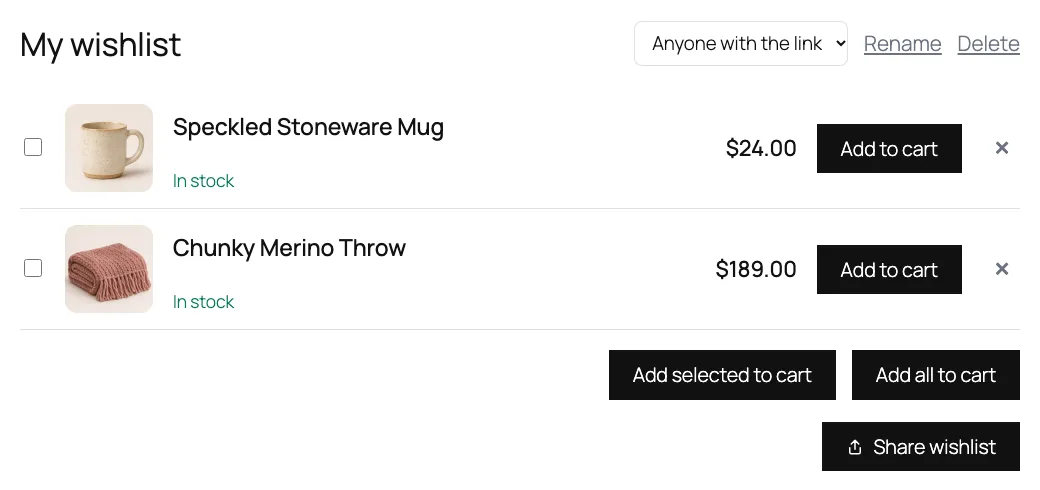
Multiple lists, guest lists, sharing and blocks are often paid extras. Here they’re in the free plugin, built so your pages stay fast and cacheable.
The HTML is the same for everyone and the hearts light up after load, so full-page caching keeps working. Custom indexed tables, not post meta.
Guest lists live in the shopper's browser by default: no database rows, no cookie. They move into the account on login or sign-up.
Adding uses a POST request, so there are no ?add_to_wishlist= URLs for bots to crawl, and shared pages are hidden from search engines.
The phone's own share sheet on mobile; Copy link, Email, WhatsApp, SMS, Telegram, Facebook, X and Pinterest on desktop. Shared lists have Add all to cart.
Logged-in shoppers keep lists like “Birthday” and “Home ideas”, with a small “Save to…” picker when they have more than one.
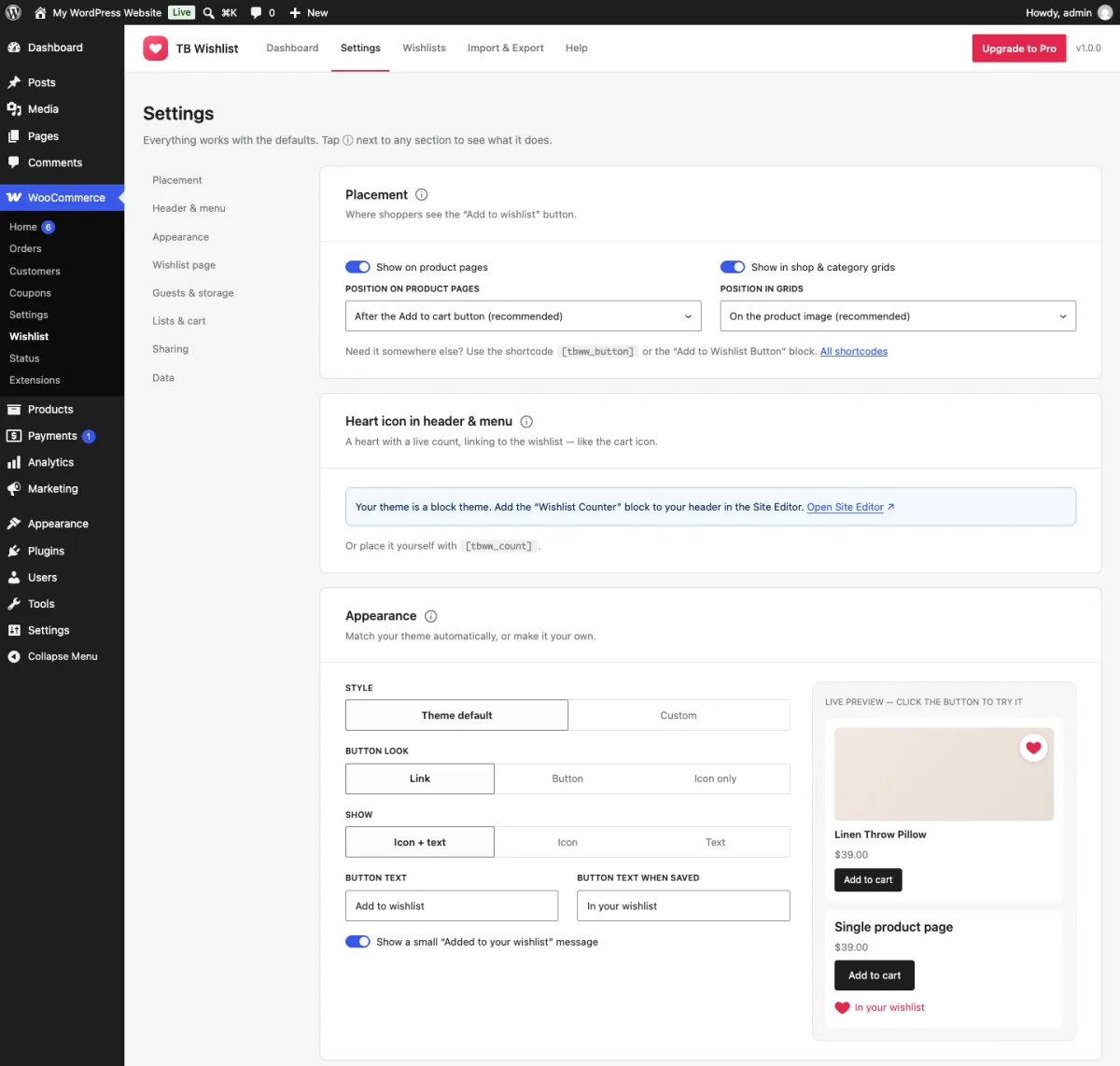
Theme default uses your theme's fonts, colors and buttons. Or pick a color, a heart, star or bookmark, and a size, with a live preview.
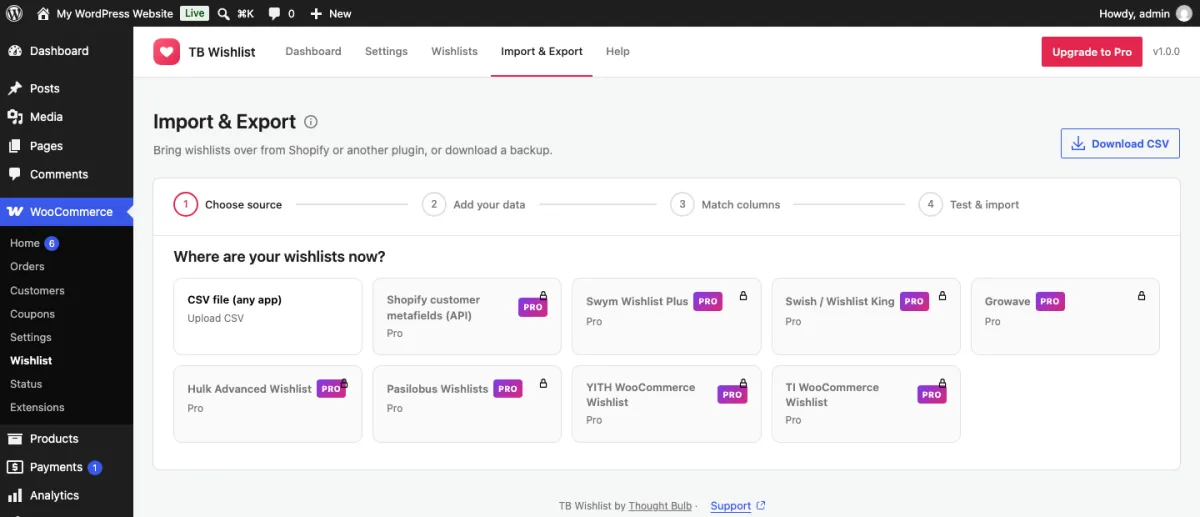
Real screens from a WooCommerce store running TB Wishlist.
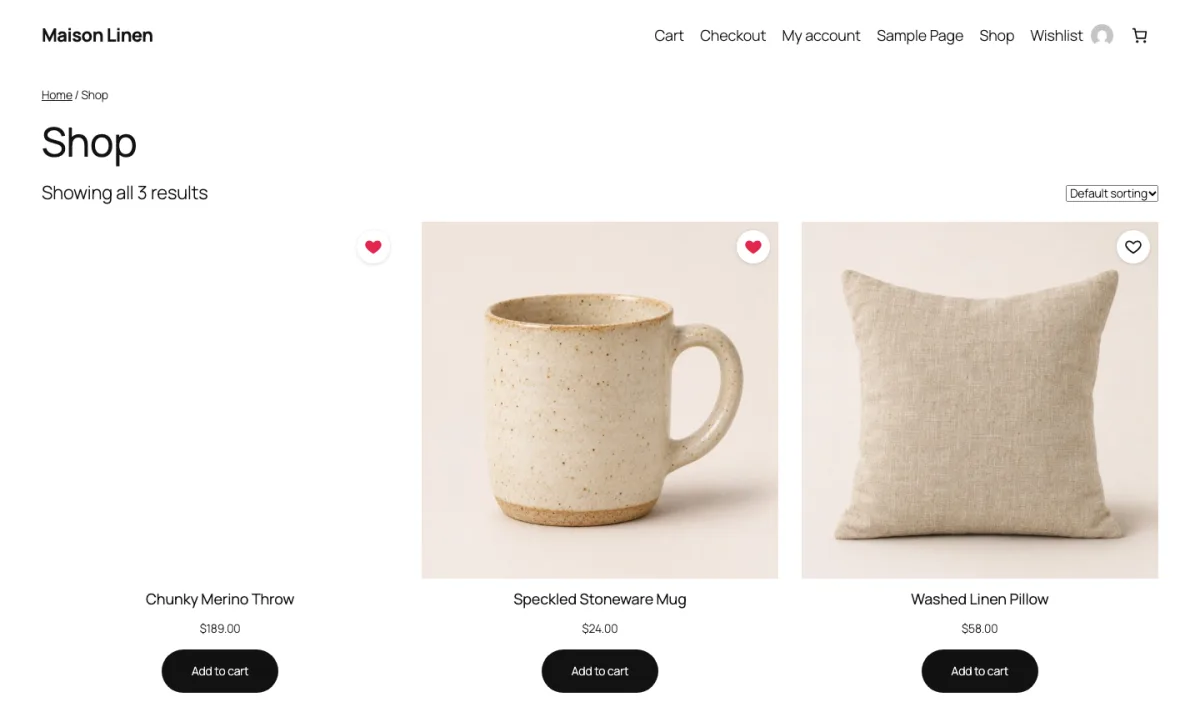
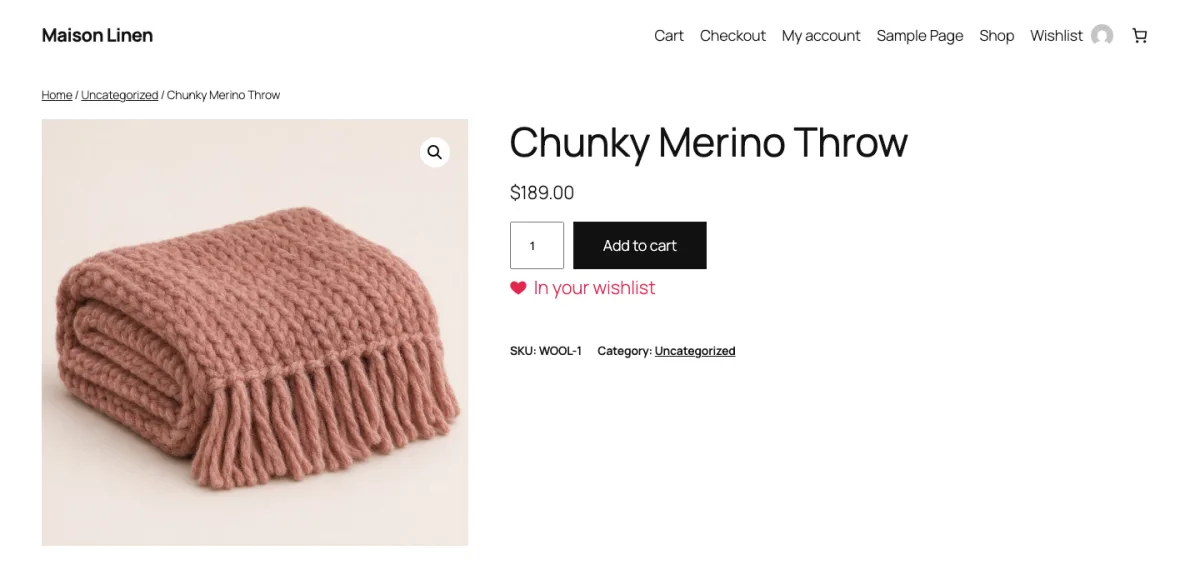
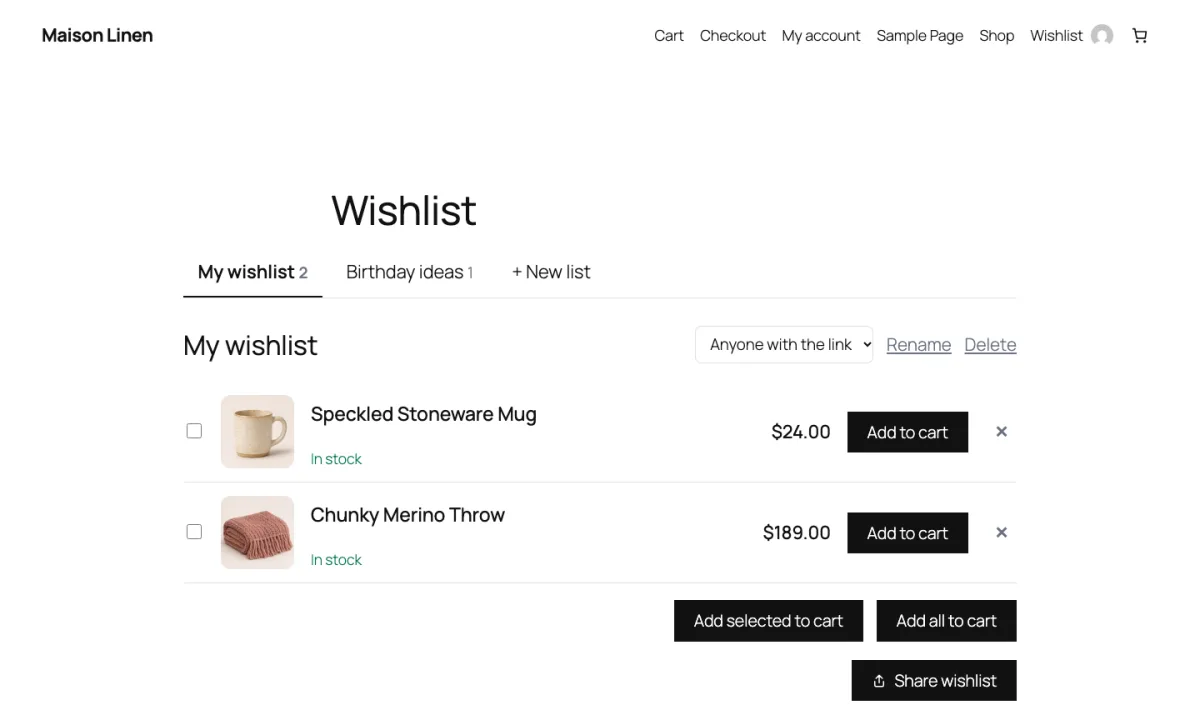
A wishlist is a list of things people already want. Pro tells them when the moment to buy arrives, and shows you what it earned.
Sent when the price drops by your threshold, 5% by default, since they saved it or since the last alert.
Sent when a product, or the variation they saved, goes from out of stock to in stock.
Sent when stock reaches WooCommerce’s low-stock threshold. Add an optional coupon to any alert.
Orders, items and the wishlist-to-cart rate, plus a most-wished-for vs. sold table with restock and discount hints.
Shopify has no built-in wishlist, so each app keeps its own data. TB Wishlist reads them, and the two biggest WordPress wishlist plugins too. Read the import guide.
CSV preset for the emailed wishlist export.
CSV preset, or connect with your API key. Import your customers into WooCommerce first.
Connect with an API key from Swish support.
CSV presets. Pasilobus matches by ID, SKU or handle; Hulk by handle, then title.
Read straight from their tables on the same site.
An email column and a product ID, SKU or handle is enough.
The details are in getting started.
Install Thought Bulb Wishlist from Plugins → Add New. A Wishlist page is created for you.
On the product image, after the title or price, or next to Add to cart. Block themes get it automatically.
Moving from Shopify, YITH or TI? Import with a dry run first, so customers keep their saved items.
Price-drop and back-in-stock emails go out on their own, with an optional coupon. Almost-sold-out emails are one switch away.
The WooCommerce wishlist plugins stores ask us about most.
| TB Wishlist | YITH Wishlist | TI Wishlist | WPC Smart Wishlist | WooCommerce Wishlists | |
|---|---|---|---|---|---|
| Guest wishlists | Free, in the browser | Free | Free | Free | Yes |
| Multiple lists | Free | Paid | Paid | Paid | Yes |
| Price-drop and back-in-stock emails | Pro | Paid | No automatic alerts | No | No |
| Migration from Shopify apps | Pro | No | No | No | No |
| Price | Free · Pro from $59/yr | About $79–105/yr | From $79 | $29–99 one-time | $89/yr |
From each plugin’s wordpress.org listing and pricing page in November 2026; YITH’s price is from a third-party listing. Check before you buy.
Pro is billed yearly. The three Pro plans have the same features; they differ only in how many sites you can use them on.
Unlimited sites
Everything shoppers see: guests, multiple lists, sharing and blocks.
Support included
1 site
For one store that wants wishlists to bring sales back.
Billed yearly in USD, tax added at checkout
5 sites
For merchants with a few stores, or a small agency.
Billed yearly in USD, tax added at checkout
Unlimited sites
For agencies that install it on every client store.
Billed yearly in USD, tax added at checkout
Sold through Dodo Payments, our merchant of record, so tax is handled at checkout. Pricing details and FAQ.
More in the documentation FAQ.
TB Wishlist Pro emails shoppers when a saved product drops in price by your threshold (5% by default), comes back in stock, or reaches WooCommerce's low-stock level. Each change is emailed once, you can cap emails per shopper per day, add a coupon, and edit the emails under WooCommerce → Settings → Emails.
Yes. By default a guest's wishlist is saved in their own browser with localStorage, so there are no database rows and no cookie. When they log in or sign up, it moves into their account. You can switch to server storage if you want guest lists in your reports.
Yes. The HTML is identical for every visitor and the heart states are filled in by a small script after the page loads, so full-page caches and CDNs keep working.
Export the wishlist CSV from your Shopify app (Growave, Hulk and Pasilobus have exports; Swym and Swish connect by API in Pro), then use WooCommerce → Wishlist → Import & Export. Products match by stored Shopify ID, SKU or handle, customers by email, and customers without an account get their list when they sign up.
Yes. TB Wishlist Pro reads the YITH and TI wishlist tables on the same site and imports them with a dry run first, so you don't need to export anything.
Yes. It adds the heart to the product image or Add to cart block on block themes, and ships three blocks: Wishlist, Add to Wishlist Button and Wishlist Counter. Classic themes and page builders work too, with shortcodes.
The plugin is free. Pro is $59 a year for one site, $129 a year for five sites, or $249 a year for unlimited sites. Support is free for everyone.
It works with WordPress's Export and Erase Personal Data tools, adds suggested privacy policy text, and the free plugin makes no external requests unless a store manager opts in to setup emails, which never include shopper data. Shared pages load no third-party share scripts.
Install the free plugin and the hearts are on your store in minutes. Add Pro when you want the alerts.